
The Complete Guide to Using the DiDi App (Incl. English Interface Setup)
Preparation: Download & Registration
Step 1: Download the App

Search for “DiDi” in your app store (e.g., App Store or Google Play).
The icon is the orange-and-white “D” letters. Download the app named “滴滴出行”
Step 2: Register an Account
1.Open the app. It may automatically detect your phone’s language.
2.Tap “Sign up”.
3.Enter your foreign mobile number.
4.You will receive an SMS verification code; enter it to complete the verification.
Tip: Ensure your phone can receive international SMS in China (enable international roaming).
Setup: Switching to English & Linking Payment
Step 1: Switch to the English Interface
1.After successful registration, you’ll see the main screen.
2.Tap the profile icon in the top left corner.
3.In the menu, find and tap the gear icon for “Settings”.
4.On the Settings page, look for the “Multi-Language” or “Language Settings” option.
5.Select “English”.
6.The entire app interface will then switch to English.
Step 2: Link a Payment Method
1.In the English interface, go to the “Me” page by tapping your profile icon.
2.Select “Payment Methods”.
3.You have several choices, Options 1 or 2 are highly recommended:
Option 1: Alipay – Recommended!
Select “Alipay”, and the app will redirect you to Alipay for authorization.
If you’ve set up Alipay with your international card per our previous guide, this is the most seamless method.
Option 2: WeChat Pay – Recommended!
Select “WeChat Pay” and authorize via WeChat. This is also very convenient if you have it set up.
Option 3: International Credit Card
Select “Credit Card” and enter your Visa or Mastercard details.
Please note: Directly linking an international card may not work in all regions or for all ride types and is less reliable than Alipay/WeChat Pay.
Option 4: Cash
Select “Cash”. While available, it is strongly discouraged as many drivers may not carry change and often prefer digitally paid orders.
Hailing a Ride: How to Book Your First Trip
Step 1:Enter your destination
When you login in to Didi and enter its main screen,Didi willautomaticallydetect your starting location according to your GPS.You could enter thestarting location manually for a more accurate location.
You will then need to type in the destination you wish to go to.You couldtype in pinyin or the English name of the place you are going to,and Didi willmost likely to figure out the place.
You could also type in Chinese if youprefer the address to be in Chinese.
Step 2:Select a Ride Type
Express: The most economical and common choice, similar to UberX.
DiDi Premium: Priced higher, but offers better vehicle quality and driver service.
Taxi: Metered fares, paid through the app. Sometimes cheaper than Express.
Other Options: The app also offers services like DiDi Carpool. For first-time users, we recommend selecting “Express” or “Taxi”.
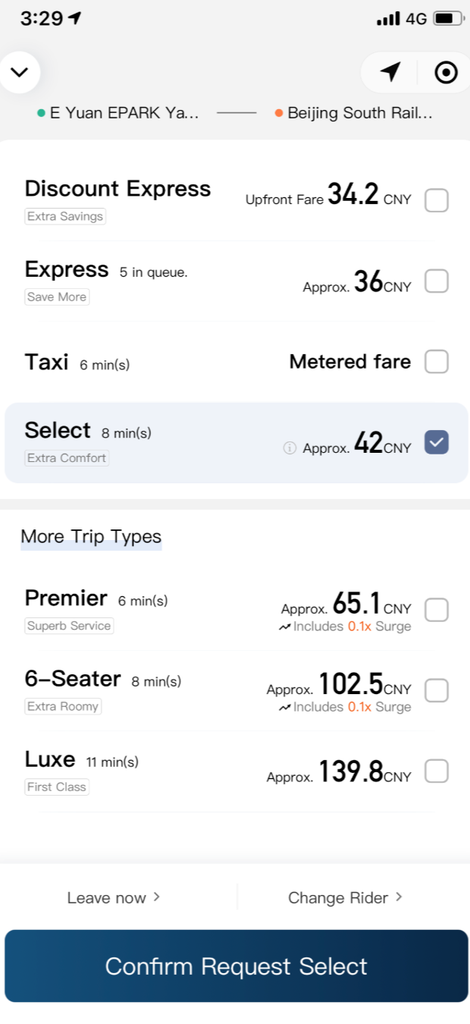
At the bottom of the page,you could choose the time for your pick-up,where you could choose to pick-up asap,or make a designated time for thedriver to pick-up.
After everything is set,your order will be sent to the nearby drivers,and youwill see the details of the driver’s plate number,name and other details aftera driver has picked your order,and an estimated time of arrival and thedriver’s current location via GPS.
Step 3:During & After the Trip
Boarding: Once the driver arrives, be sure to verify the license plate number matches before getting in.
Communication: If no communication is needed, you can remain quiet. If required, use the built-in translation feature within the app to send pre-set messages to the driver.
Exiting: Upon arriving at your destination, no action is needed. The fare will be automatically deducted via your linked payment method (Alipay, WeChat Pay, or credit card).
Rating: After the trip ends, the system will invite you to rate the driver. This helps maintain a good service ecosystem on the platform.
Tip: International travelers can open the Alipay APP, click on “Transport”, select “Taxi”, and enter both the pickup location and the destination to book a ride-hailingservice.
Frequently Asked Questions – FAQs
Q1: Can I use DiDi without a Chinese phone number?
A1: Yes! DiDi supports registration and verification with foreign phone numbers. This is a feature designed specifically for tourists.
Q2: What if the driver cancels the trip?
A2: If a driver cancels without a valid reason, the system will automatically rematch you with a new driver. Drivers who frequently cancel are penalized by the platform.
Q3: How can I ensure my safety?
A3: DiDi has robust safety features. When your ride starts, use the “Share Ride Details” function within the app to share your live location and trip details via WeChat or SMS with friends or family. The app also allows you to set emergency contacts and has a one-touch emergency alert.
Q4: What if I left an item in the car?
A4: In your order history within the app, find the corresponding trip and select “Lost & Found”. You can directly call the driver through a temporary anonymous number or seek assistance from customer service.